Product & Features
What exactly is a digital shift log, and how does it differ from a paper shift log?
A digital shift log performs the same function that the traditional paper shift log has served in industry for decades: providing complete documentation of what happened during a shift and passing this information on to the next team. At the same time, it eliminates the typical shortcomings of the paper format:
- Problems with handwriting that only the author can decipher;
- Entries that are simply forgotten because the logbook wasn’t handy at the time; or
- Searching for a specific incident buried among hundreds of pages of entries.
All of this is eliminated when the documentation is stored in a structured, searchable format within a central application that multiple people can access simultaneously.
What kind of information can I record in SHIFTGURU?
Basically, anything that’s relevant during a shift and needs to be communicated. SHIFTGURU comes with a built-in “Events” form that lets you record shift events. There are also other standard forms available that you can customize as you see fit. And with the Checklist Designer, you can create new checklists tailored exactly to your situation.
How does the shift handoff work in SHIFTGURU?
The handoff is no longer limited to a verbal briefing at the end of the shift, during which, as experience has shown, details can be lost. Instead, there is a structured digital shift handoff that the incoming shift can view immediately. The next shift leader can easily view open items, ongoing tasks, and special notes even after the handoff is complete.
Can I transfer and track tasks and to-dos between shifts?
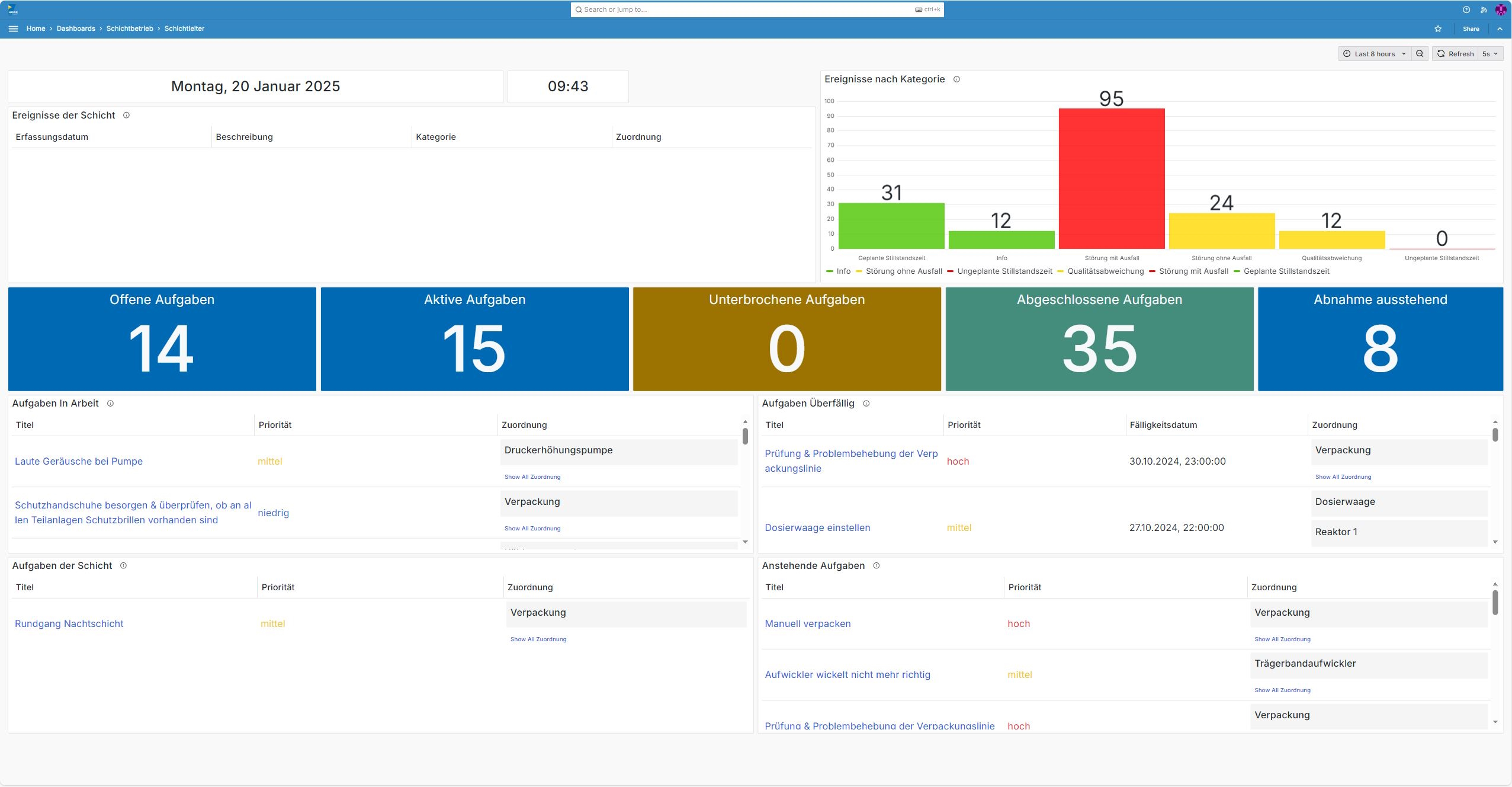
Yes. This is one of the key advantages over paper: Pending tasks are displayed centrally on the workers’ dashboard, so they’re no longer forgotten. To track progress, the shift supervisor can view the task list, where they can see the status, the person responsible, and the due date for all tasks—including an alert if the due date has passed.
In addition, tasks can be created directly from events and are then linked to one another. This ensures that the cause and the action taken remain linked and can be found without a lengthy search.
Can I attach photos or documents to an entry?
Yes. You can add photos to all shift log entries (events, tasks, instructions, information, etc.). In addition, you can attach documents or files to tasks. For custom data entry forms, you can add a control for uploading files in the Checklist Designer.
Is there a search function for past entries?
Yes. You can filter and search for entries in the shift entry tables. In addition, we are currently developing an AI-powered search function that will allow you to search for content related to your shift from anywhere.
Applications & Industries
For which industries is SHIFTGURU suitable?
For manufacturing, logistics, the chemical industry, the food industry, automotive manufacturing, the energy and water sectors, as well as facility and service management.
Can multiple locations or facilities be represented in a single system?
Yes. SHIFTGURU has a physical model that can represent multiple locations.
Is SHIFTGURU also suitable for shift models with rotating teams (e.g., 3-shift operation)?
Yes. In addition, SHIFTGURU allows you to have different shift models within a single shift, e.g., a 3-shift operation Monday through Friday and a 2-shift operation on Saturday and Sunday.
Technology & System Environment
Does SHIFTGURU run in the cloud, or can I also run it on-premises?
Both. You can run SHIFTGURU in the cloud or set up an on-premises installation at your location.
Which devices are supported (desktop, tablet, smartphone)?
Desktops, tablets, and smartphones are supported. We recommend using the app on a desktop or tablet.
Do I need an internet connection to use SHIFTGURU, or is there an offline mode?
An internet connection (cloud) or intranet connection (on-premises) is required to sync with the main system. However, SHIFTGURU can otherwise be used offline.
Data Security & Privacy
Is there a permissions model for different user roles?
Yes. SHIFTGURU has a very detailed permissions model based on the ABAC system.
What is the backup strategy?
For cloud installations, backups are created automatically on a regular basis. Backup schedules are agreed upon individually with the customer. In addition, you can create backups manually to provide a second layer of protection. For on-premises installations, the customer is responsible for backups.
Integration & Interfaces
Can SHIFTGURU be integrated with third-party systems?
Yes. SHIFTGURU can generally be connected to third-party systems via a REST API. Specific interfaces can be arranged on a case-by-case basis.
Can I manage users via Active Directory / SSO?
Yes. SHIFTGURU can be integrated with an existing Active Directory. Additionally, single sign-on (SSO) can be enabled by integrating with an SSO provider.
Introduction & Transition
What exactly does the transition from a paper shift log to SHIFTGURU involve?
iMes supports you during the implementation process with key user training and, if needed, user training as well. In addition, one of our staff members is always available to assist you during business hours.
Use in Everyday Work
How steep is the learning curve for employees who are used to working with paper?
The development of SHIFTGURU focuses on intuitive, easy-to-use functionality, so the learning curve for your employees is relatively gentle. To provide support, we offer key-user training sessions where we explain the application in detail to your key users. In addition, the user manual can be accessed at any time directly from within the application.
Does SHIFTGURU also work for employees with little experience using software?
Yes. Thanks to our permission system, your workers see only the information relevant to them by default, so they aren’t overwhelmed by unnecessary details. The standard data entry forms are clearly structured and clearly alert users to missing or incorrect entries. For your own checklists, you can use a wizard control that guides users through the checklist. You can clearly describe each field in your checklists using tooltips and notes.
Can I use SHIFTGURU in multiple languages?
Yes. SHIFTGURU is currently available in 23 languages. Users can switch the language directly within the client without having to reload the application.
Support & Maintenance
What kind of support will I receive after my purchase—by phone, email, or in person?
We provide support via email and phone during standard German business hours. Our support is also redundant, which means you’ll have at least two points of contact with us. Additional options may be available upon request.
How often are updates provided, and are they included in the price?
The standard maintenance package includes 2 updates per year. Update cycles that differ from the standard can be discussed on a case-by-case basis.

 Dashboard
 Tasks
Tasks Shift Events
 Shift Handover
 Instructions
 Infoboard
 Digital Checklists
 Personalization